CTET photo size: 10–100 KB
Source-based guidance for the September 2026 bulletin, with photo and signature requirements shown together. Applicable for CTET September 2026; check the bulletin for any later session.
September 2026 bulletin
CTET photo and signature requirements
Both images are required. These values come from the bulletin’s upload instructions, not from a generic exam template.
| Item | Requirement / setting | Source or limitation |
|---|---|---|
| Photograph | JPG/JPEG · 10–100 KB · 3.5 × 4.5 cm | September 2026 bulletin, Important Notes (c), PDF p.3. |
| Signature | JPG/JPEG · 3–30 KB · 3.5 × 1.5 cm | September 2026 bulletin, Appendix IV, Step 3, PDF p.27. |
| Pixels and DPI | Tool defaults, not published mandates | The cited upload instructions specify centimeters and KB, not an exact pixel count or DPI. |
Before uploading: Check both uploaded images in the CTET application preview. Passing local file checks does not guarantee acceptance.
Official sources · reviewed
Independent preparation guidance. SignResize is not affiliated with the examining authority.
What changed in this review?
Corrected the signature minimum from 4 KB to 3 KB; separated published centimeter sizes from tool pixel defaults.
Start with your image
JPG, PNG, WebP and browser-supported images · up to 15 MB
CTET September 2026: latest photograph, JPG/JPEG 10–100 KB, 3.5×4.5 cm. 350×450 px and 254 DPI are working defaults, not bulletin mandates.
Selecting your strongest native tongue (e.g. Hindi or Regional Language) as Language 1 unlocks 2 straightforward prose comprehension passages instead of complex poetry analysis required under Language 2, boosting marks significantly.
Choose Image or Drag & Drop Here
Supports JPG, PNG and WebP images up to 15 MB • 350 × 450 px (10–100 KB)
CTET Photo Compliance Tools
Govt NormsReal-Time CTET Photo Preview (350 × 450 px)Live Sync
Simulated CTET Photo print preview with facial centering.
Check your signature crop before uploading
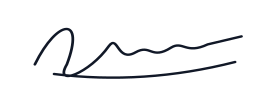
Complete, clear crop
Keep every stroke visible on clean white paper.
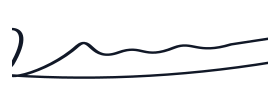
Clipped crop
Widen or reposition the crop when strokes are cut off.
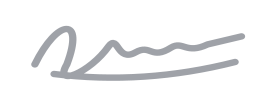
Blurred image
Rescan the original; compression cannot restore missing detail.
Illustrations show crop quality only. Submit a scan or photograph of your own physical handwritten signature, following the official exam instructions.
🛡️ 4 Rules to Avoid Photo Rejection for Central Board of Secondary Education (CBSE)
- 1 Keep your latest photograph and signature as separate JPG/JPEG files.
- 2 Preserve the required aspect ratio without stretching the face or signature.
- 3 Open the downloaded image and check its byte size, clarity and complete crop.
- 4 Use the bulletin for your session; the December 2022 page is historical reference.
❓ Frequently Asked Questions (Central Board of Secondary Education (CBSE))
Is the CTET signature minimum 3 KB or 4 KB? ▼
The September 2026 bulletin specifies 3–30 KB. We corrected the previous 4 KB tool minimum to match that source.
Are exact pixels or 200 DPI mandatory? ▼
The cited upload section specifies centimeters and file-size ranges. It does not mandate exact pixels or 200 DPI. Our pixel canvas is a processing default.
Where can I check the CTET 2022 photo and signature size? ▼
Use the separately labelled December 2022 archive linked above. Do not use an old session’s page as the authority for a later application.
📘 Central Board of Secondary Education (CBSE) Preparation & Upload Guides
All Guides →CTET 2026 Master Guide: Syllabus, Eligibility, Document Upload & Preparation
Complete CTET 2026 handbook covering syllabus, eligibility, photo and signature resizer, image discrepancy removal, previous papers, and DigiLocker download.
Top 5 Signature & Photo Mistakes That Lead to Government Exam Rejection
Avoid the most frequent mistakes that disqualify thousands of candidates in SSC, UPSC, IBPS, and State PSC applications before the exam day.